-
RoleHead of Product Design
-
Year2024
-
CategoryAI-Native • SaaS
Sphera
Turning complex customer data into actionable ecommerce revenue using AI.
Context & Product Definition
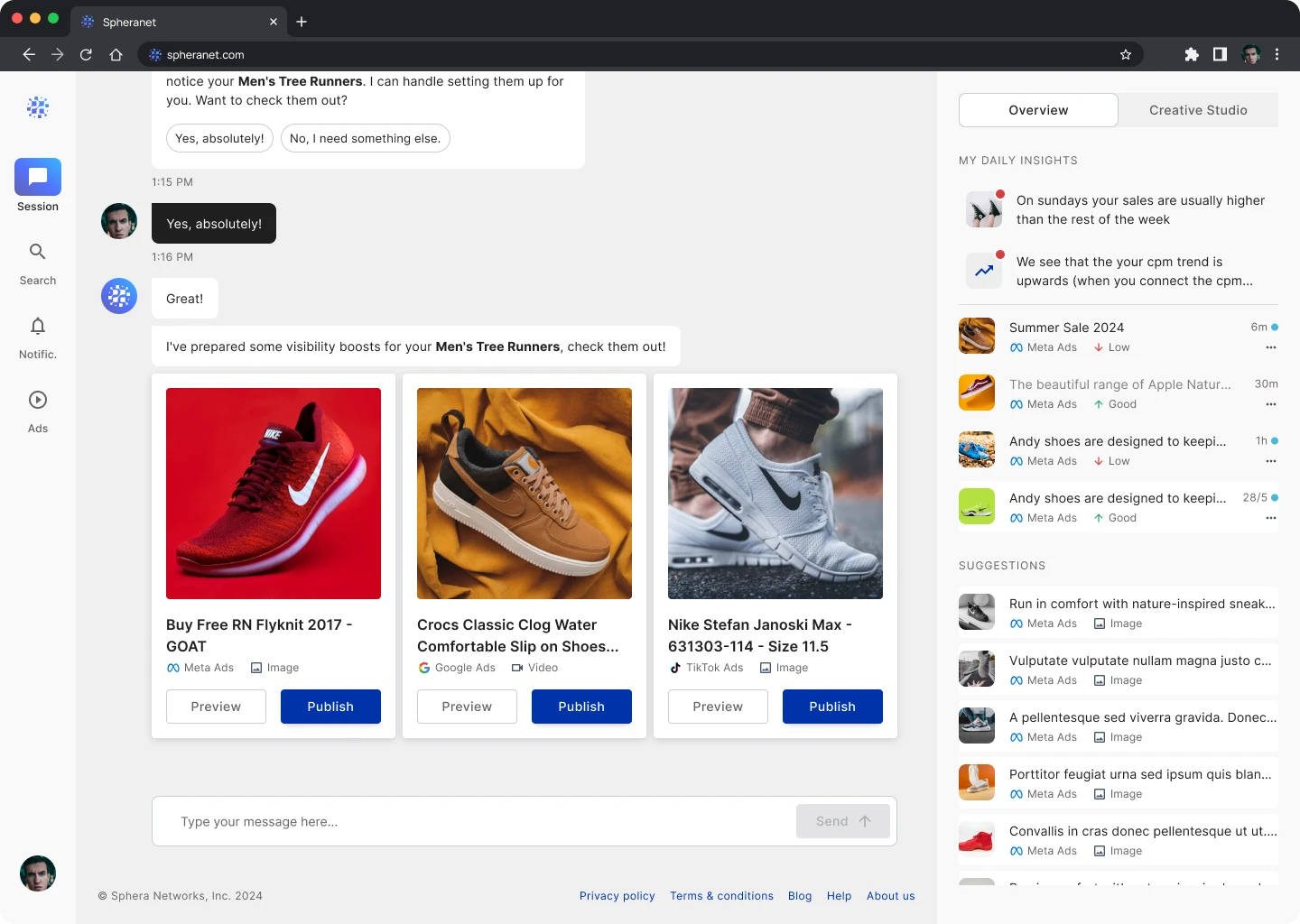
Sphera is an AI-powered intelligence platform designed for online retailers. It aggregates fragmented data from marketing channels (Meta, Google, TikTok) and store performance (Shopify, Magento) to provide a unified view of ROI.
The Goal: To move ecommerce managers from "Analysis Paralysis" to "Actionable Strategy." By rebranding and redesigning the platform from the ground up, we aimed to democratize access to advanced data science, allowing non-technical merchants to optimize campaigns with a single click.
My Role & Scope
Role: Head of Product Design
Focus: End-to-End UX/UI, Moving from (SQDL -> Sphera) branding, Data Visualization and Design System implementation.
I worked alongside ex-Meta, ex-Google executives and product managers.
The Challenge (UX Analysis)
The original platform (SQDL) was powerful but technically overwhelming. Users were facing three core problems:
Data Overload: Merchants were drowning in spreadsheets and raw numbers without understanding the story behind them.
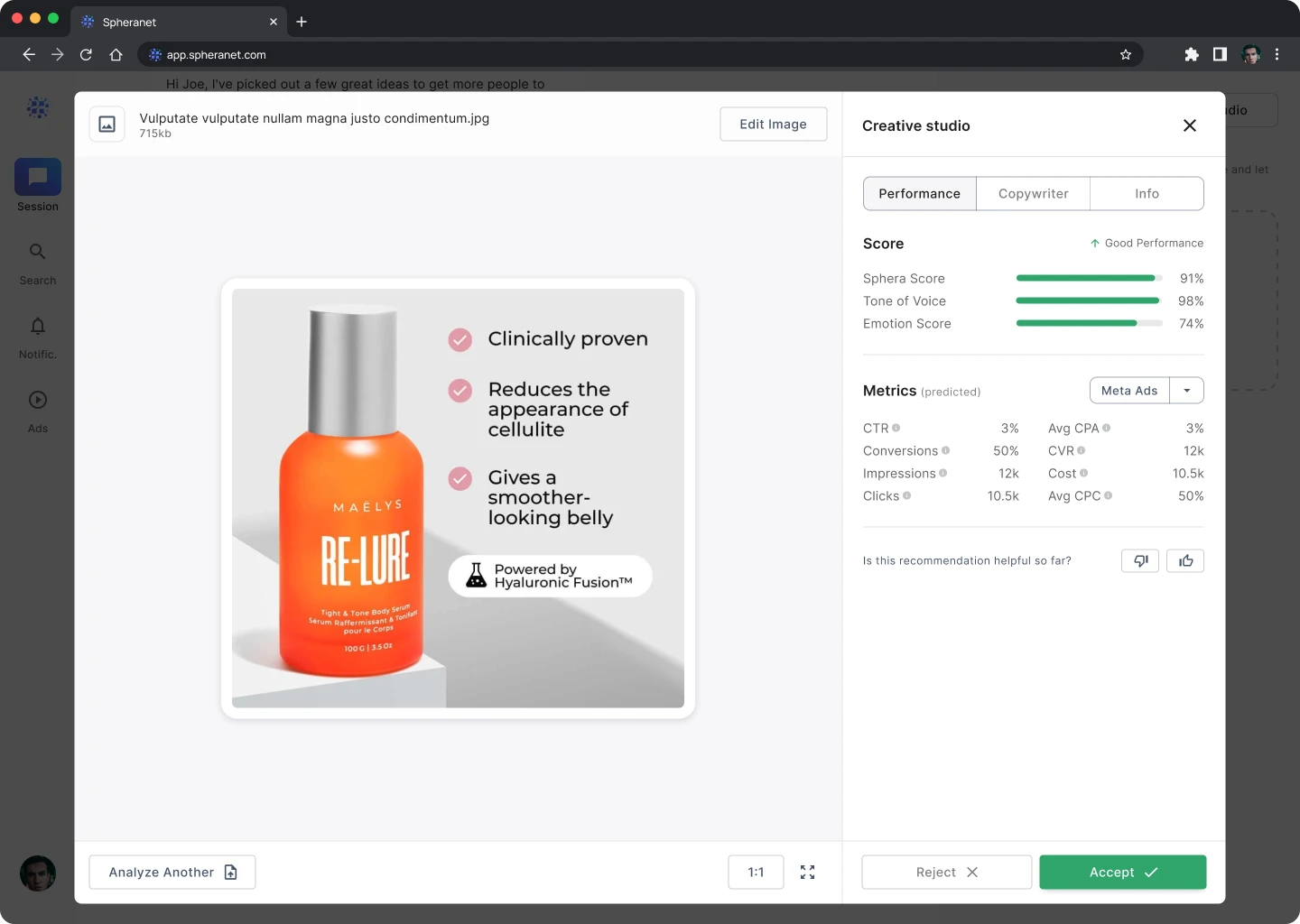
The "Black Box" Problem: Users didn't trust the AI recommendations because the interface didn't explain why a suggestion was made (e.g., "Why should I increase budget here?").
Fragmented Workflows: Users had to switch between the platform and their ad managers to make changes.
The User Pain Point: "I know I'm wasting money on ads, but I don't know which ones to turn off."
The Solution
Instead of just showing graphs, the interface focuses on Insights & Actions. We introduced "Explainable AI" patterns (UI elements that break down the logic behind a prediction in plain English) to build user trust.
The "Overview" Dashboard: A prioritized feed of anomalies (e.g., "Ad spend spiked but sales didn't") rather than a generic wall of charts.
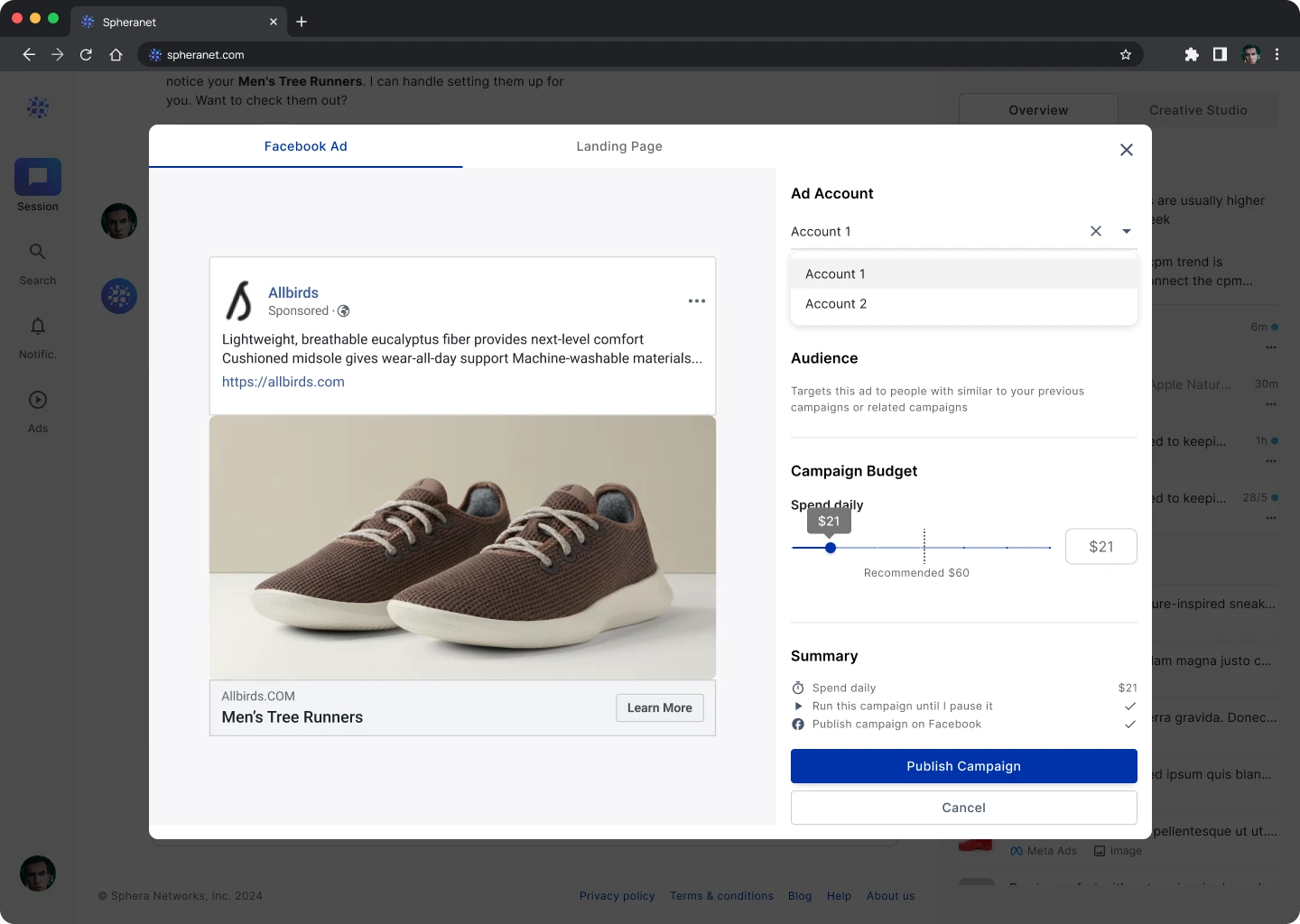
Integrated write-access APIs so users can accept an AI recommendation (e.g., "Pause Campaign") directly within Sphera, closing the loop.
Main Features
- Real-time synchronization with Facebook Ads, Google Ads and e-commerce backends.
- AI automatically clusters customers (e.g., "Whales," "Churn Risk," "Window Shoppers") for targeted campaigns.
- Predictive modeling that estimates revenue for the upcoming month based on current trends.
- An "Accept" button that instantly applies budget changes to live campaigns.
App Architecture
The architecture is built on a Drill-Down Model:
- The Overview (Surface): High-level health scores and critical alerts.
- The Intelligence Layer (Analysis): Dedicated views for "Acquisition," "Retention," and "Product Performance."
The Engine Room (Configuration): Granular settings for attribution models and data source integrations.
Materials Used (UI & Design System)
Color Palette:
- Trustworthy Neutrals: Heavy use of whitespace and cool grays to let the data breathe (The platform was also dark-mode ready).
- Created a categorical color palette ensuring that charts with 5+ variables remained distinct and color-blind accessible.
- Soft Red (Negative trend) vs. Mint Green (Positive trend) used sparingly to draw attention.
Typography:
- Used tabular lining figures (monospaced numbers) within [Insert Font, e.g., Inter or Roboto Mono] to ensure financial data aligned perfectly in vertical columns.
- "Insight Cards," Data Tables with sticky headers and interactive Line/Bar charts using a customized chart library.
User Flows
.1 - User logs in and sees a "Critical Alert" on the Dashboard (e.g., "ROAS dropped below 2.0")
.2 - User clicks the alert to open the Detail View
.3 - Sphera displays the root cause: "Campaign B is targeting an exhausted audience."
.4 - Sphera suggests: "Rotate Creative" or "Decrease Budget."
.5 - User clicks "Apply Fix." The system confirms the change via API and marks the alert as resolved

Hollistic Design Work
.1 - User logs in and sees a "Critical Alert" on the Dashboard (e.g., "ROAS dropped below 2.0")
.2 - User clicks the alert to open the Detail View
.3 - Sphera displays the root cause: "Campaign B is targeting an exhausted audience."
.4 - Sphera suggests: "Rotate Creative" or "Decrease Budget."
.5 - User clicks "Apply Fix." The system confirms the change via API and marks the alert as resolved